vise DMW · Data Migration Workbench
Know what will fail before you load.
Business and IT run the data side of a migration on one screen: extract, validate, profile, map fields and values, simulate the load, post through standard interfaces, report. The whole chain — or the layer in front of the load tool you already have.
- Since 2017
- in production at a global brewing group
- 8 steps
- extract to report
- Dozens
- of countries migrated to SAP
01
One workbench. Three ways to bring it into a programme.
DMW sits where data-quality tools and migration tools overlap. Customers use the whole chain, or only the part their integrator is missing — nobody has to change their load tool.
02 · The eight steps
Every step is governed. Every step is visible.
Pick a step to see what it does and what the screen looks like.
Step 01 · Extract
Pull the data out of the source, as it is.
SAP ECC, JD Edwards, Dynamics, legacy systems, databases or flat files. Every object: customer, vendor, material, business partner, finance, plant maintenance, assets, GL, cost centres. Extracts are versioned so a validation run can always be traced back to the exact source snapshot.
- Any object; sources: ERP tables, databases, staging tables, flat files
- Versioned snapshots
- Throughput benchmarked on your data in the PoC
Screens for this step are shown in the migration walkthrough — or on your own object in the 30-day PoC.
Step 02 · Scope
Decide what is in and what stays behind.
Programmes, projects and sites are first-class: a rollout is a programme, a country is a project, each with its own objects, milestones and owners. Scope rules say which records travel — active vendors only, open items after a cut-off date — and the rest is excluded on purpose, not by accident.
- Programme → project → site hierarchy
- Scope rules per object
- Milestones with owners and dates
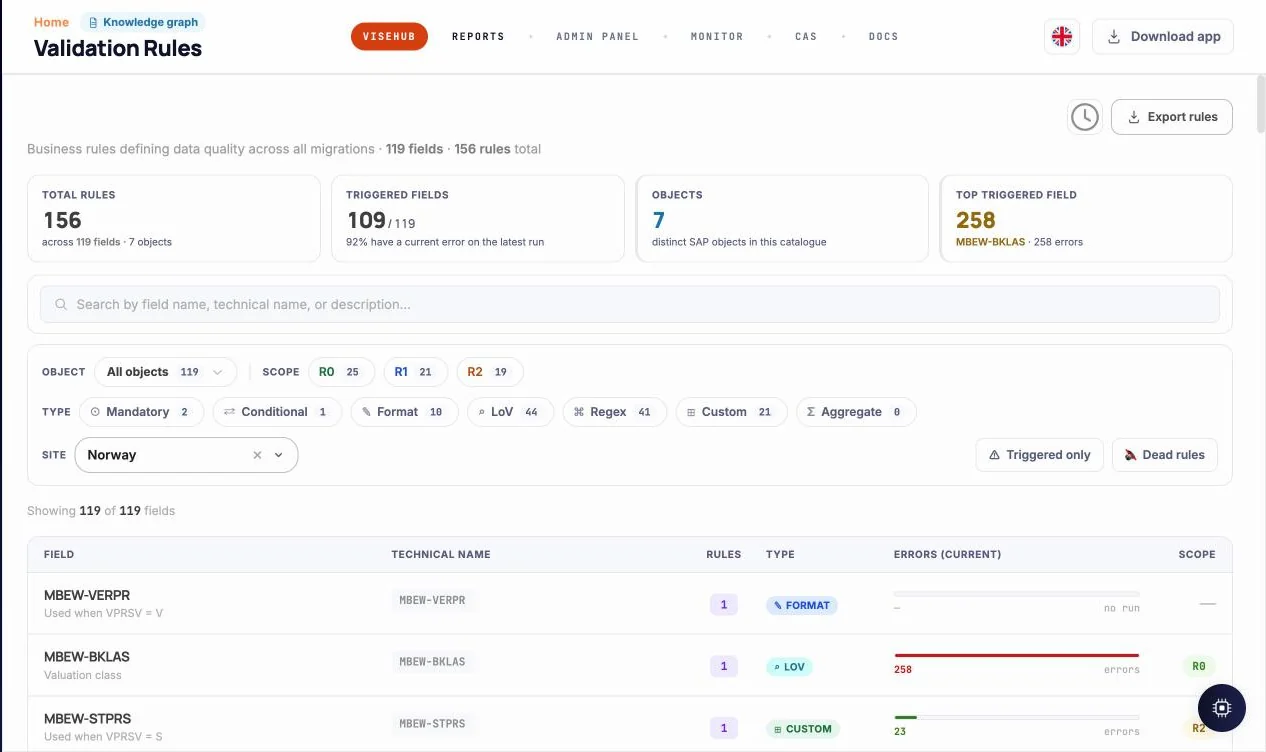
Step 03 · Validate
Rules as code, run on every record, owned by a named person.
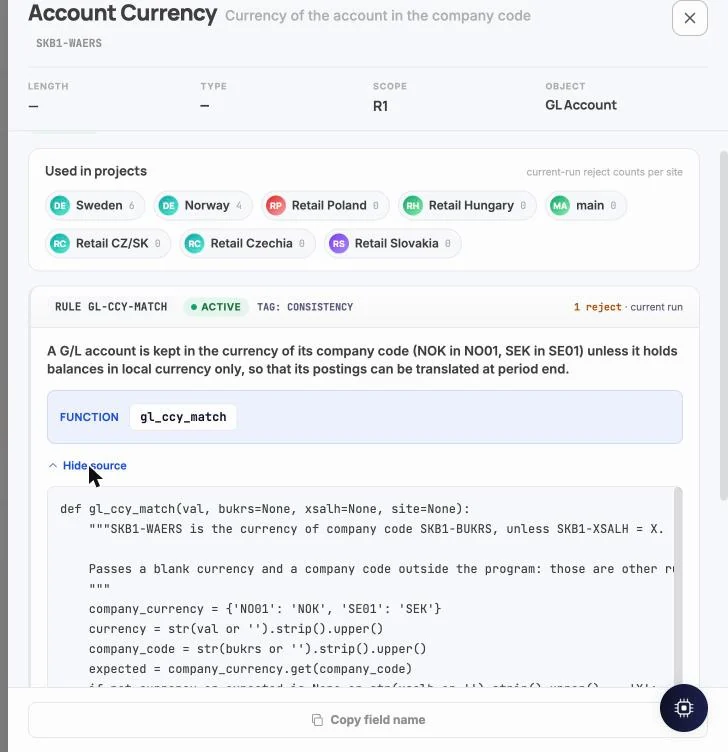
Validation rules are small functions with a scope, a severity, a documented reason and an owner. They are versioned, tested in a sandbox and run against the live extract. Business users see the results per object and per field; architects see the source. AI can draft a rule from a sentence — a person activates it.
- Format, LoV, conditional, custom and aggregate rules
- Severity, scope and owner on every rule
- AI-drafted, human-activated
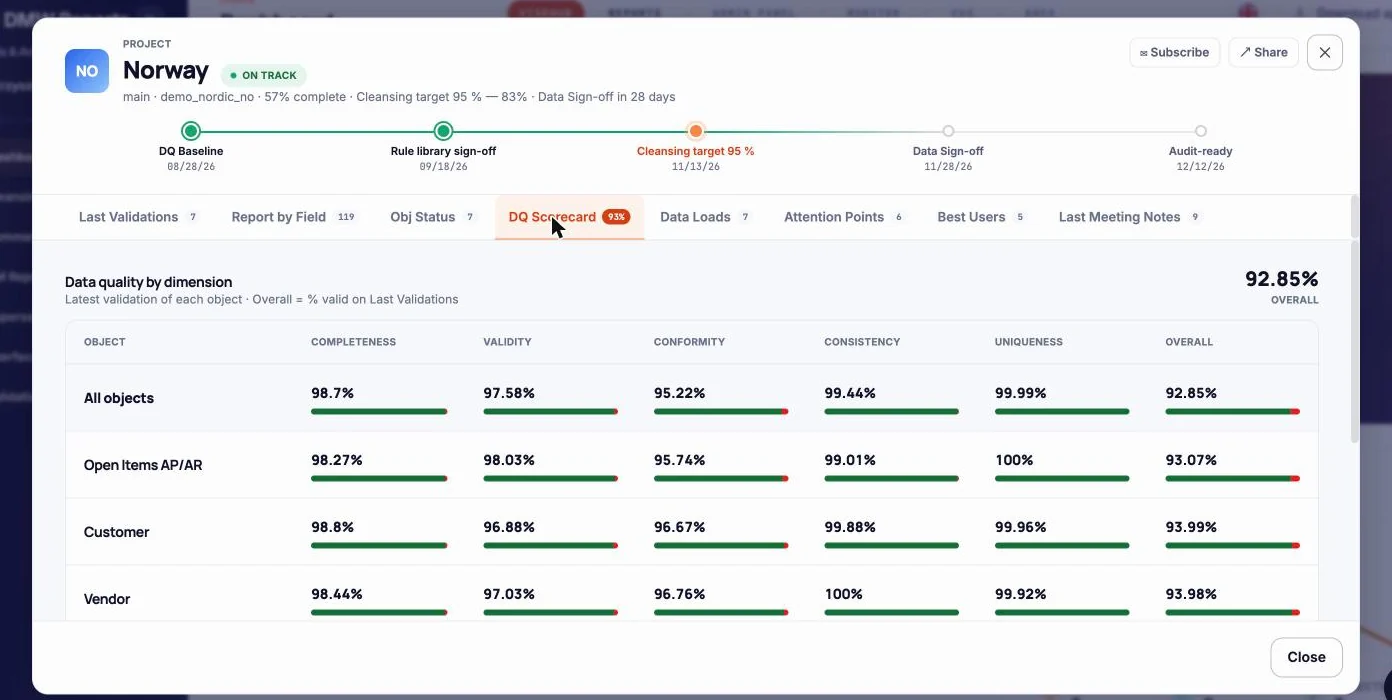
Step 04 · Profile
Know the shape of the data before you argue about it.
Completeness, validity, conformity, consistency and uniqueness per object and per field, with distributions and outliers. The DQ scorecard is the number the steering committee gets: one score per site, one per programme, and the trend since the baseline.
- Five DQ dimensions per object
- Scorecard per site and programme
- Baseline and trend from day one
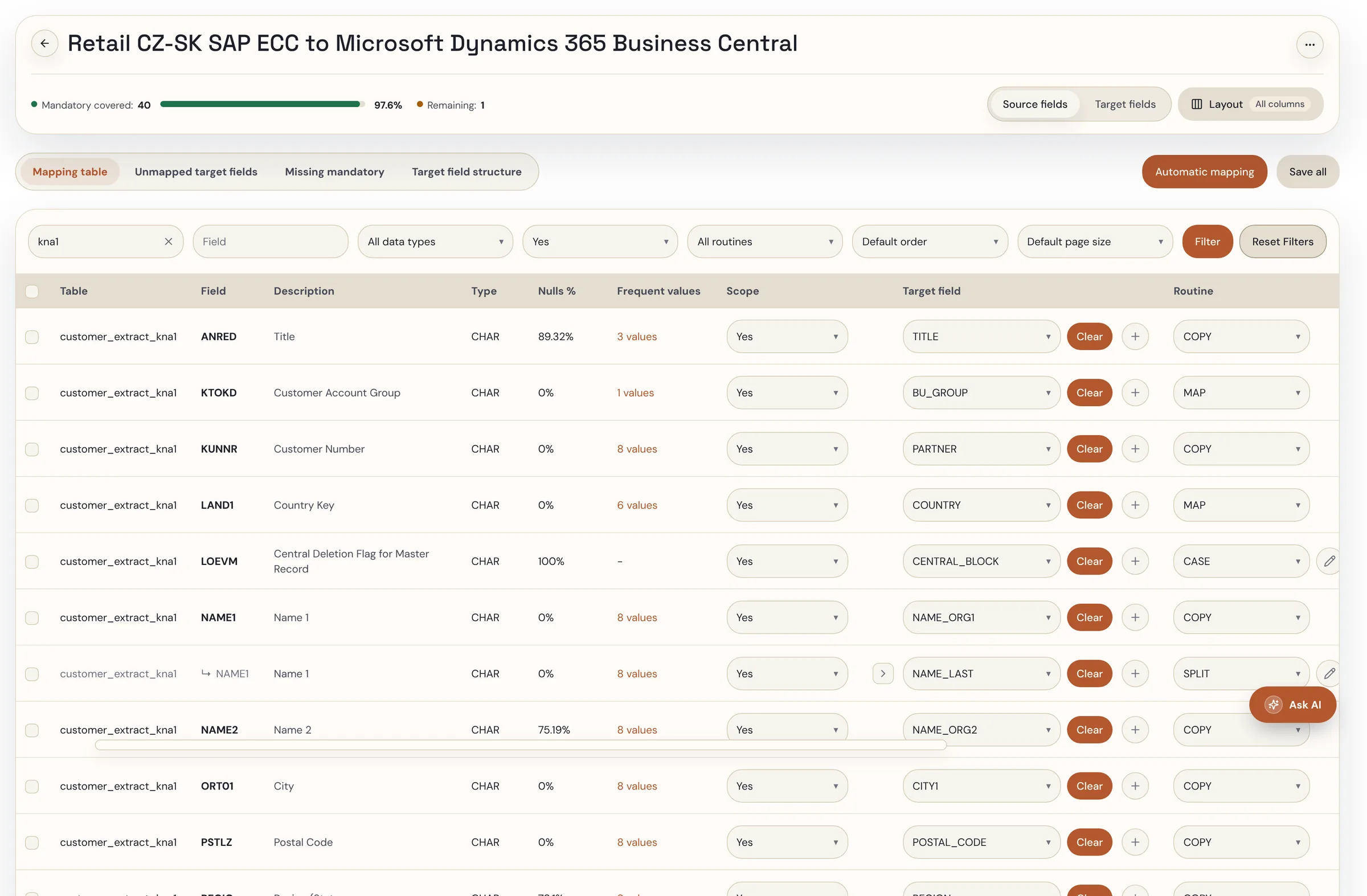
Step 05 · Field Map
Source field to target field, with the transformation written down.
The mapping is a specification the project lives by, not a spreadsheet nobody can find. With vise FieldMap, the first draft — field pairs, transformation rules, confidence score — comes from the model; your consultant accepts, edits or rejects every line, and every decision is versioned before anything is transformed.
- Mapping as a versioned spec
- AI draft with confidence score (FieldMap)
- Line-by-line approval
- vise FieldMap →
Step 06 · Value Map
Harmonise values once, reuse across every site and wave.
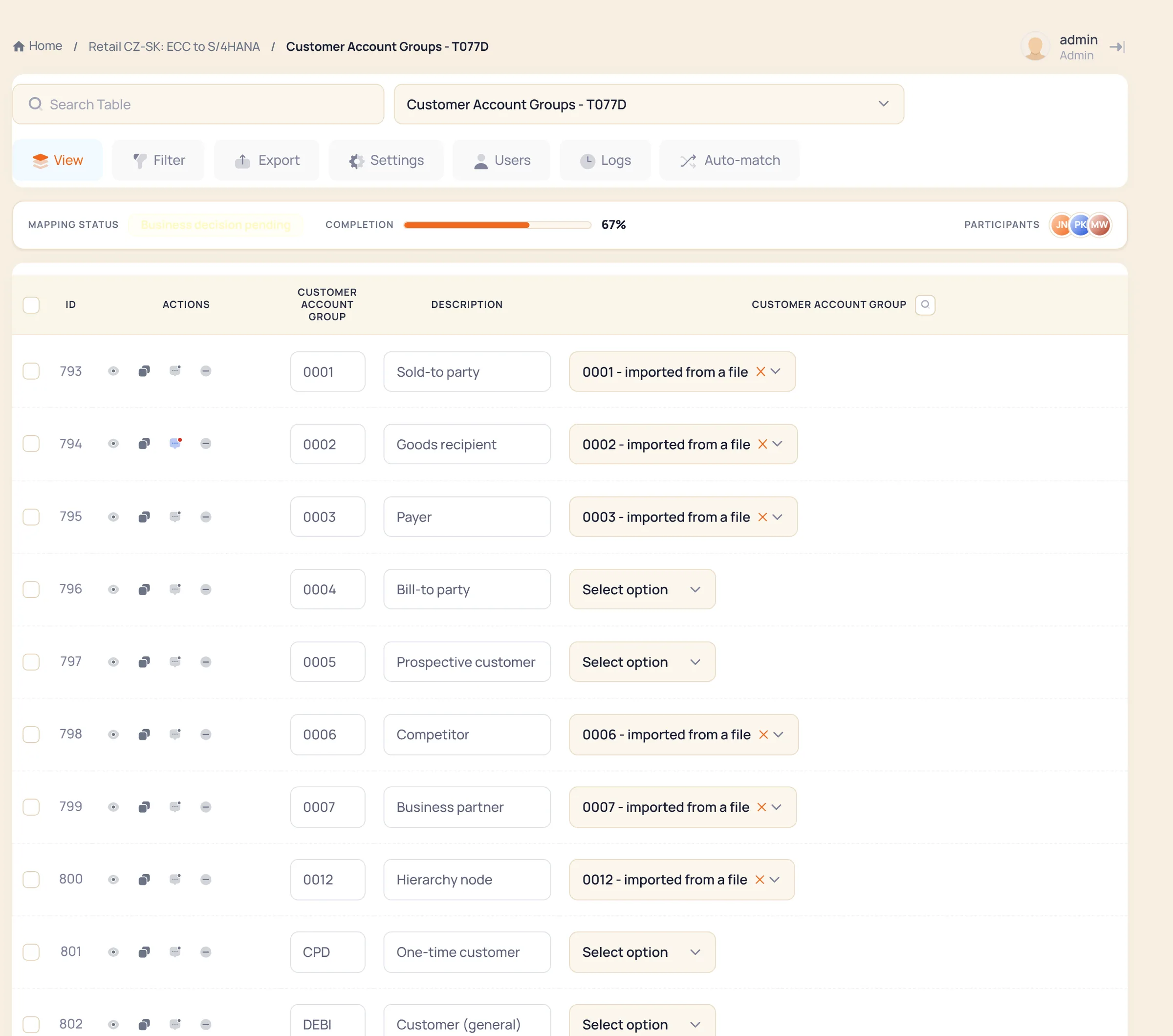
Payment terms, account groups, countries, currencies, units: mapped by business users in vise LoV-MAP, approved once, applied everywhere. Global and local lists of values live as dictionaries DMW validates against, so a value that is not on the list never gets loaded.
- Global and local lists of values
- Business users map, not developers
- Dictionaries reused by validation
- vise LoV-MAP →
Step 07 · Load Sim
Dry-run the load. Fix what fails. Then post.
Before anything is posted, DMW runs the dataset against the rules of your target system with your customizing — mandatory fields per role and grouping, account groups, number-range assignment rules, country tax formats, BAdI-level checks — and against the business rules SAP does not know. Every rejected record comes back with the reason and goes to the correction queue; the run is repeated until it is clean. The target system validates every record exactly as it would on the real load — you get the same errors back, per record, and nothing is committed. The real load then runs through the same interfaces with per-record error handling. Change mode updates what already exists instead of reloading everything.
- Target rules with your customizing, not just file format
- Rejects per record, with the reason, into the correction queue
- Change mode for existing records
Screens for this step are shown in the migration walkthrough — or on your own object in the 30-day PoC.
Step 08 · Report
Reports your business owners can read without a developer.
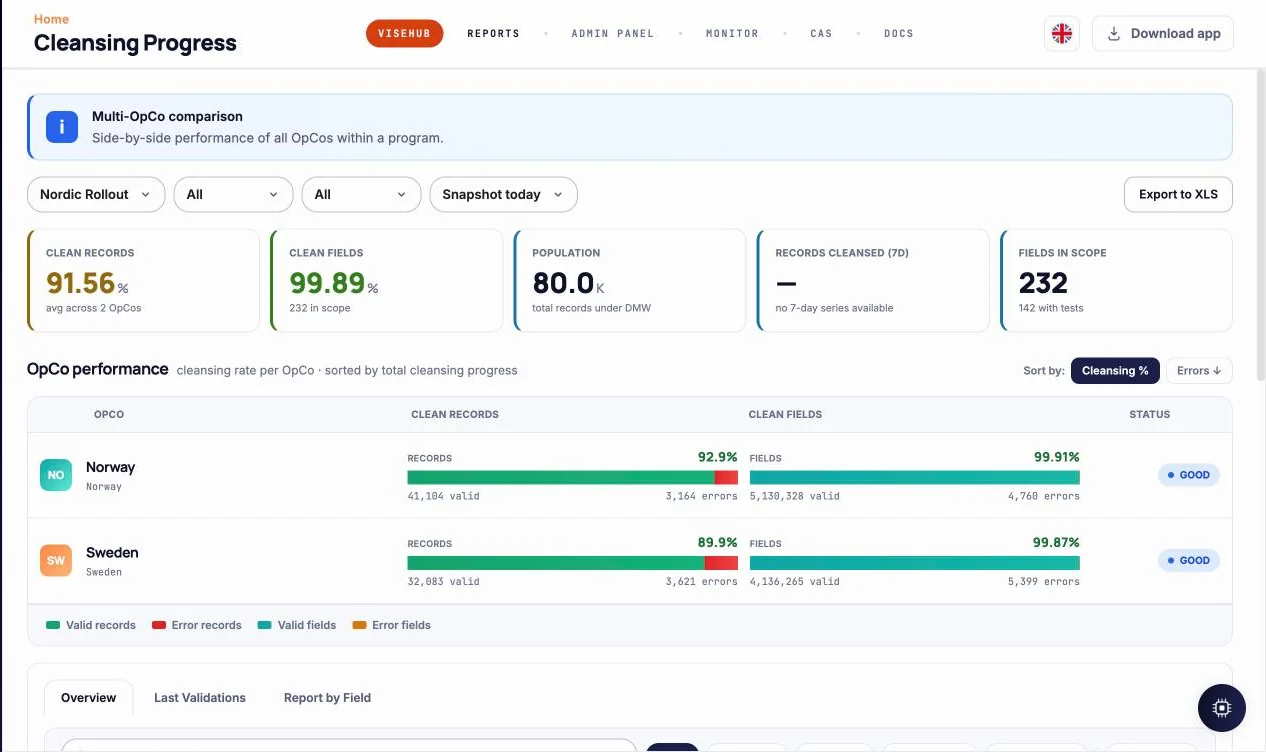
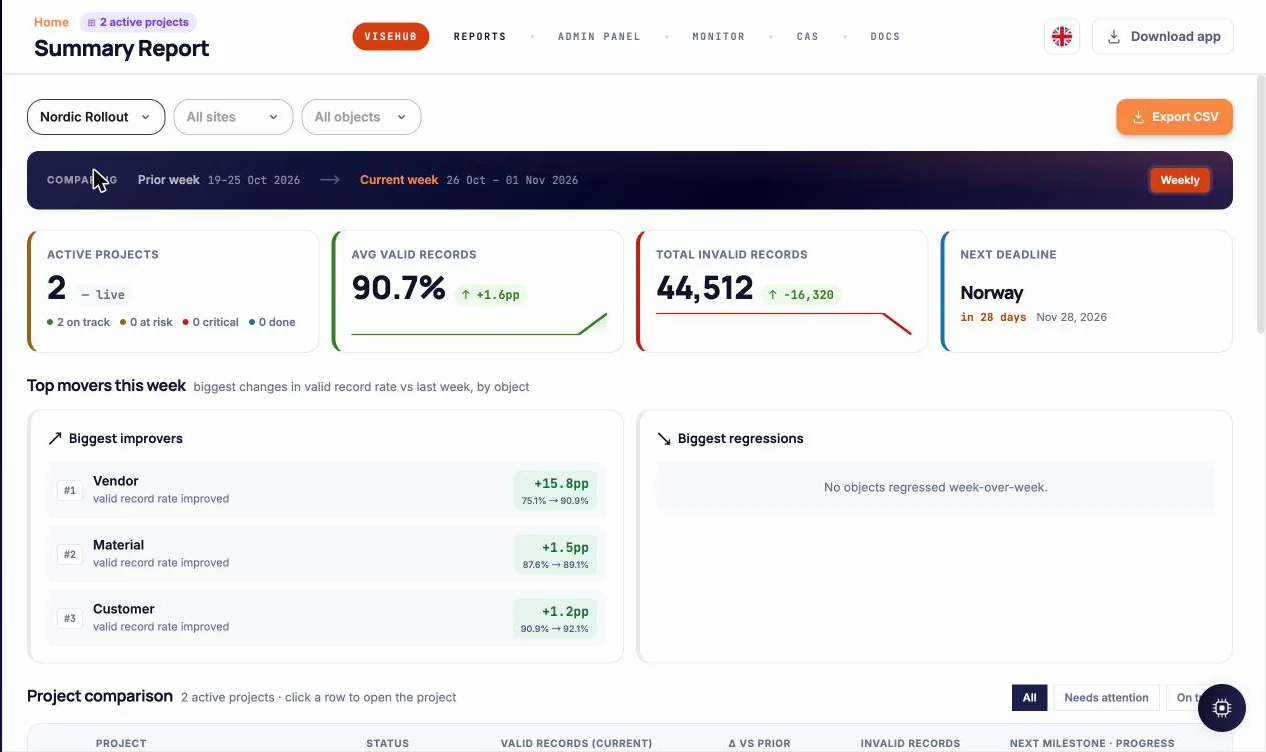
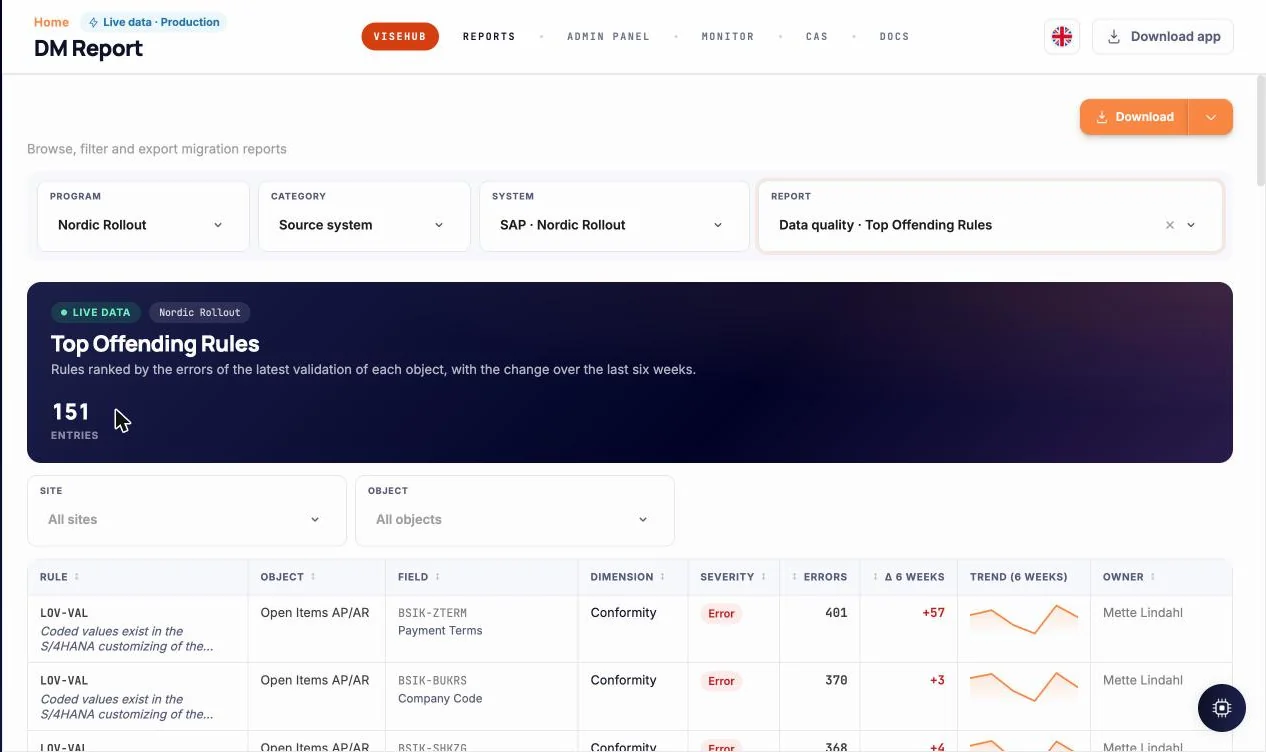
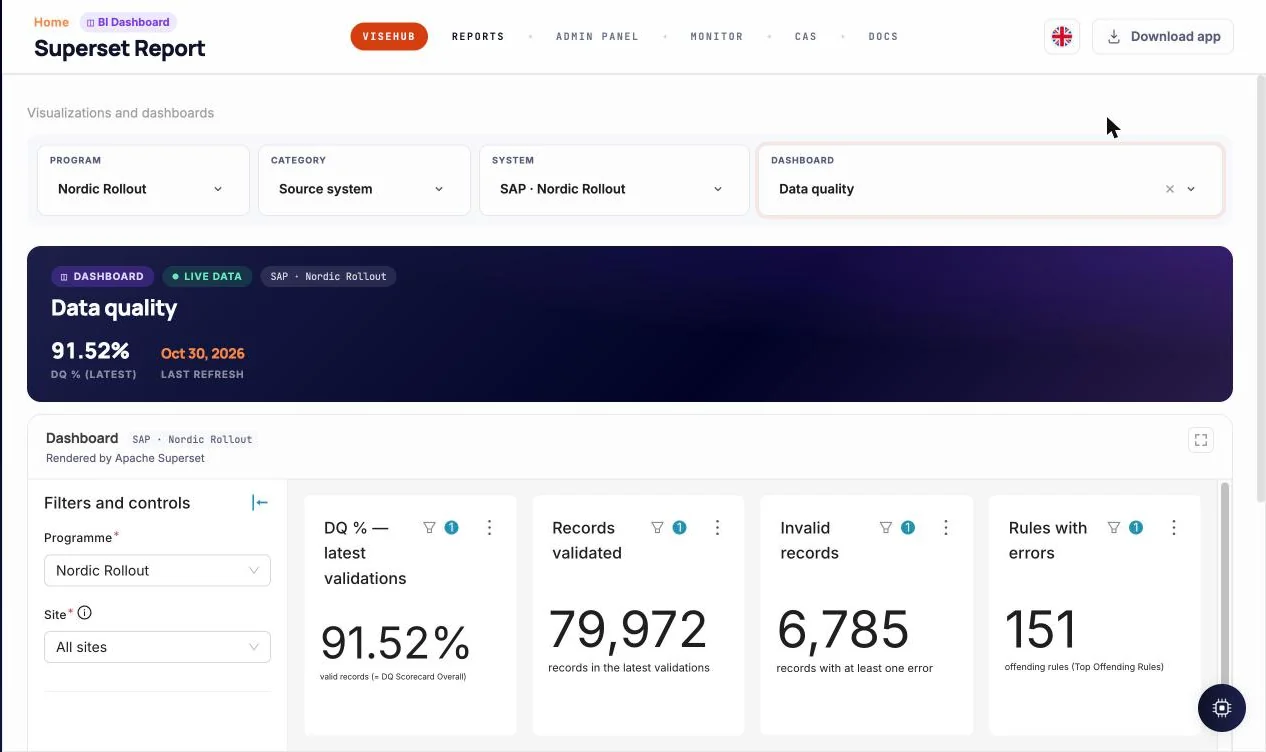
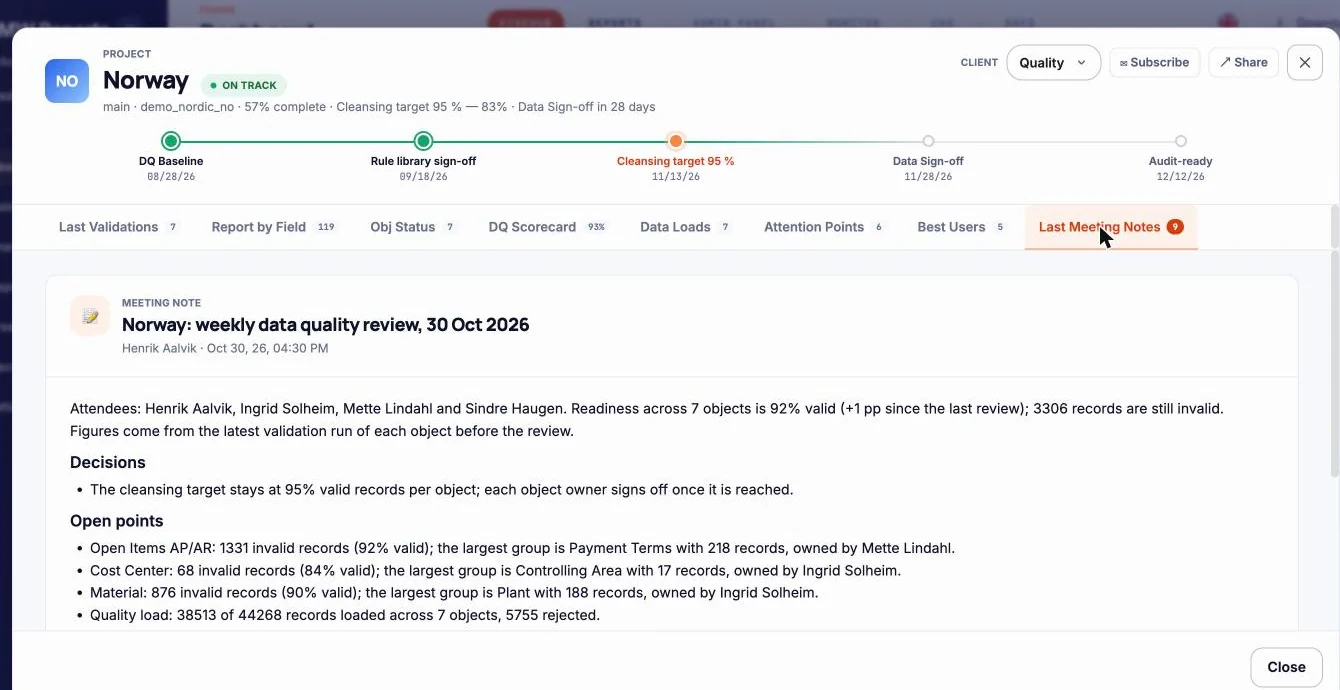
Cleansing progress per operating company, the weekly summary with movers and regressions, top offending rules with six-week trends, meeting notes and attention points per project — in DMW Reports and in Apache Superset on the same data.
- Per-site and per-programme views
- Week-over-week movement
- Superset dashboards on validated data
03 · Into an existing pipeline
Your integrator keeps the load tool. vise DMW sits in front of it.
Source → DMW (extract, validate, map, simulate) → the load path you already have → S/4HANA. Three ways to wire it, chosen per object. vise DMW keeps the rules, the mappings and the audit trail; SAP keeps the records.
In every option the load goes through SAP’s standard interfaces, so CVI, customizing checks, BAdI/exits, number ranges and authorizations stay active. DMW never writes to a table directly.
04 · Rules as code
AI drafts the rule. A person switches it on.
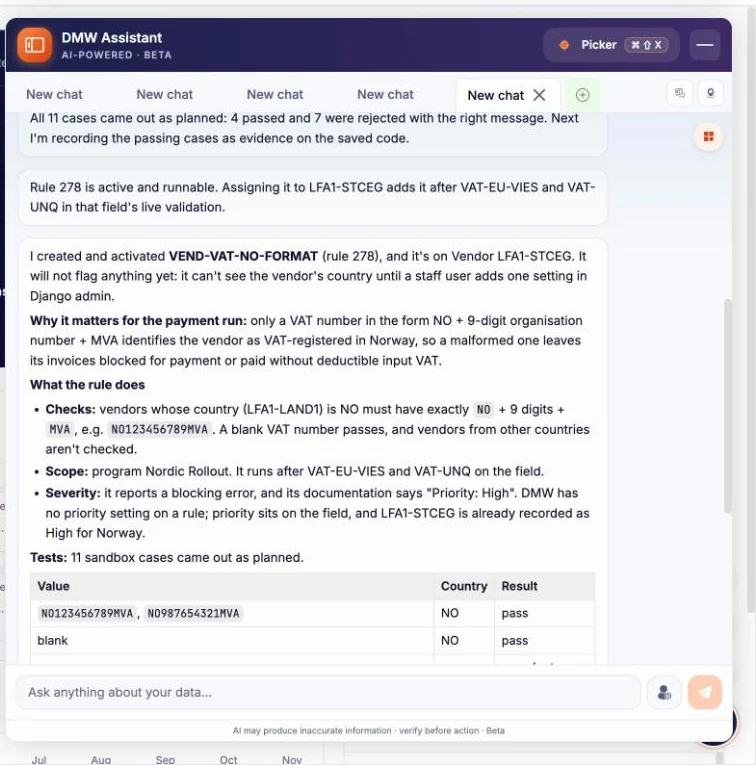
Describe the check in a sentence — “a Norwegian vendor’s VAT number must be NO plus nine digits and MVA” — and the DMW assistant drafts the rule, runs it in a sandbox against real records and reports what passed. The rule is a readable function with a scope, a severity and a documented reason. Activating it is a human decision, logged with the user and the time.
- Every rule has an owner, a version and a sandbox test result.
- Architects read the source; business owners read the sentence.
- Nothing the AI writes runs on production data until approved.
05 · Reports
Data quality your business owners can read.
Not a developer’s log. The pages a programme manager, a data steward and a steering committee open every week.
06 · For SAP architects
Standard interfaces. No surprises in your system.
The questions we get in every architecture review, answered the same way every time.
The full architecture page- 01How does DMW load into S/4HANA?
- Through standard BAPIs, IDocs and OData only. Never a direct table write. Business Partner goes through CVI like any SAP-approved tool.
- 02Can it feed Migration Cockpit or BODS instead of loading?
- Yes. vise DMW can be the DQ and mapping layer in front of your existing load tool, or the load tool itself. For Migration Cockpit it delivers pre-validated files in the template format; for BODS or a custom loader, the mapped dataset as CSV, XML, JSON or staging tables with the mapping specification. Our longest-standing customer runs it in front of BODS.
- 03What does Load Sim check?
- The simulation runs the dataset against your target’s rules with your customizing: mandatory fields per role and grouping, account groups, tax formats per country, BAdI-level checks — plus the business rules SAP does not know. Because the target system itself validates each record, the simulation returns the same errors the real load would — per record, into the correction queue — without committing anything.
- 04What do you check that Migration Cockpit does not?
- Cockpit, LSMW and BODS validate what SAP knows: formats, mandatory fields, customizing. That answers “will SAP accept it?”. DMW adds the rules SAP does not know — cross-object consistency, country and regulatory checks, finance governance, your own purchasing and sales policies. That answers “will the business work with it?”. Both layers stay on.
- 05What does the AI touch?
- Drafts only: field mappings, transformation rules, validation rules. Every proposal is versioned, tested in a sandbox and approved by a named person before it runs.
- 06Where does it run?
- In the EU, in a dedicated environment per customer (AWS or a dedicated OVHcloud server in Germany) operated by Visehub; connection to your systems through a site-to-site IPsec tunnel or an extract hand-over; named accounts and roles; TLS everywhere, encrypted backups in Frankfurt. ISO/IEC 27001 and ISO 9001. Details on the Trust page.
Works with the rest of the vise family
See your own data in DMW in 30 days.
One object from one site — customer or customer or vendor master is the usual pick — extracted, profiled, validated, field-mapped, value-mapped and load-simulated against your target. You get the data assessment report, the working project and an effort estimate for the full wave. Your side: an extract or system access, and one data owner for the decisions. Fixed-price consulting; no licence fee for the 30 days. After that: a per-project licence priced by sites and user accounts (the more sites, the lower the price per site) — your IT runs it, we run it under SLA, or hybrid.