Solution · JD Edwards → S/4HANA
From JD Edwards to S/4HANA: the data track, governed end to end.
JD Edwards keeps customers, suppliers and employees in one Address Book, dates in Julian format, amounts with implied decimals and every code list in UDC tables. S/4HANA wants Business Partners with roles and groupings, ISO dates, typed amounts and its own value lists. vise DMW handles that gap in eight governed steps — with every mapping proposed by AI, approved by a named person and simulated before it is posted.
- 8 steps
- extract to report, one platform
- 0
- direct database writes into S/4HANA
- 30 days
- to a mapped, simulated first object
01
What usually goes wrong.
02 · How it runs in vise DMW
The same discipline at every step.
- Steps 1–4 · Extract, scope, validate, profile
Extract the JDE tables, scope by company, validate against S/4 rules.
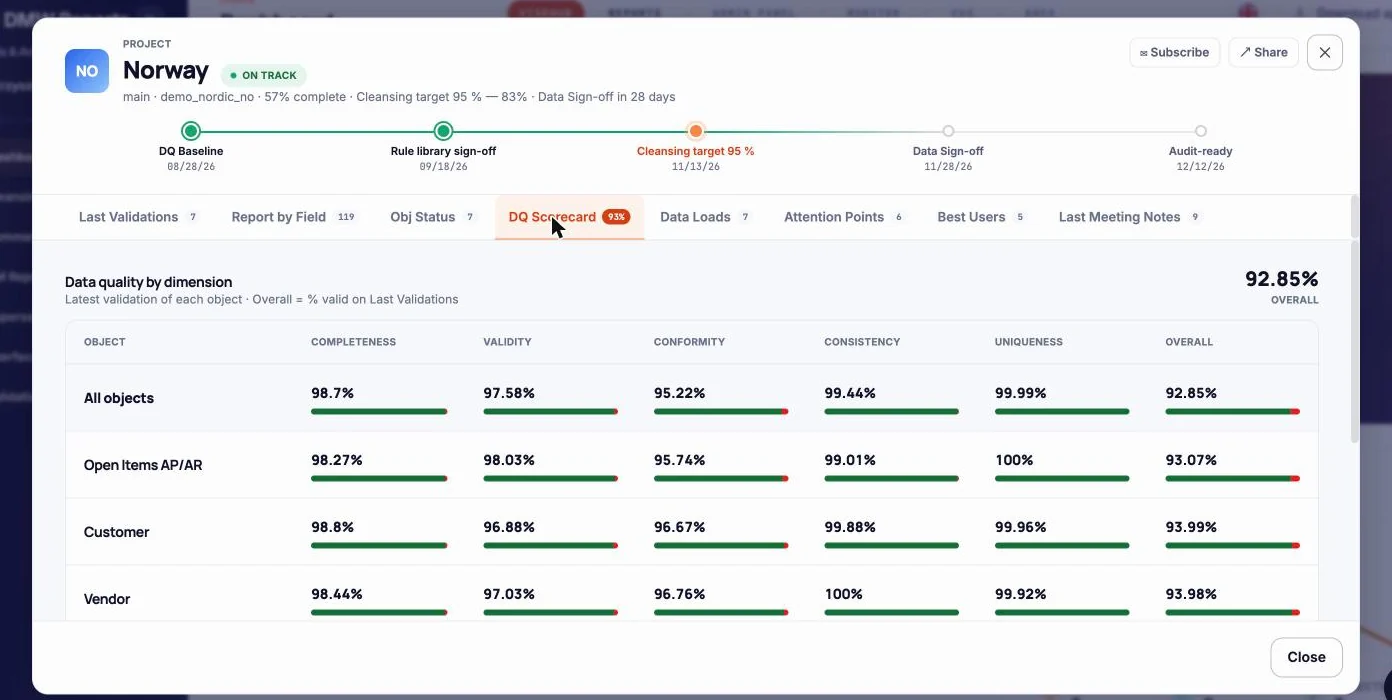
F0101 / F0111 / F0115 for addresses, F0301 and F0401 for customer and supplier masters, F4101 / F4102 for items, F0901 for accounts — extracted per company and scoped to the wave. Validation rules check what S/4HANA will reject: missing BP groupings, invalid country or tax codes, units of measure without a conversion, duplicates across search types. A DQ scorecard per company tells the steering committee how ready each one is.
Readiness by dimension and object - Step 5 · Field Map
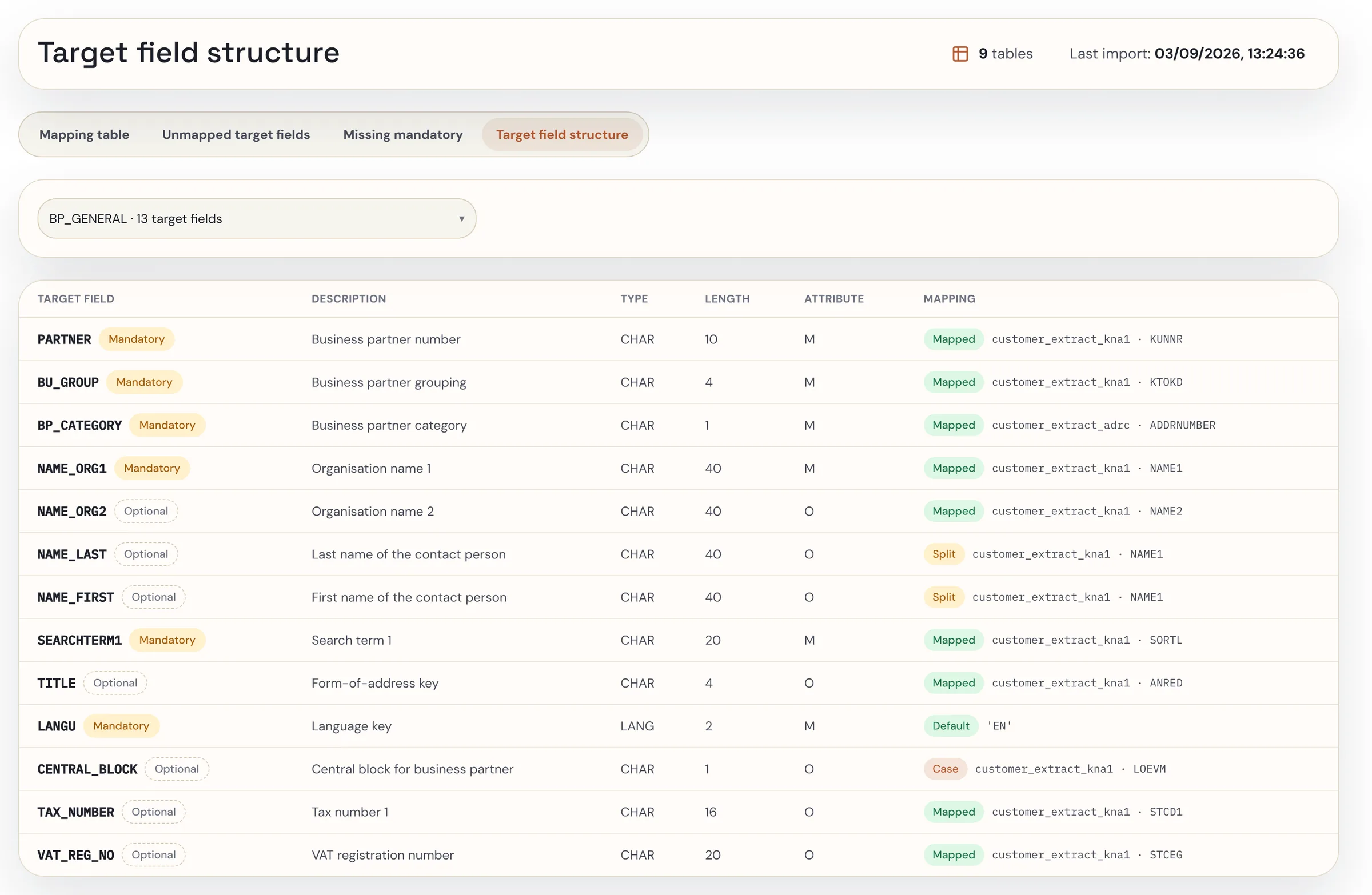
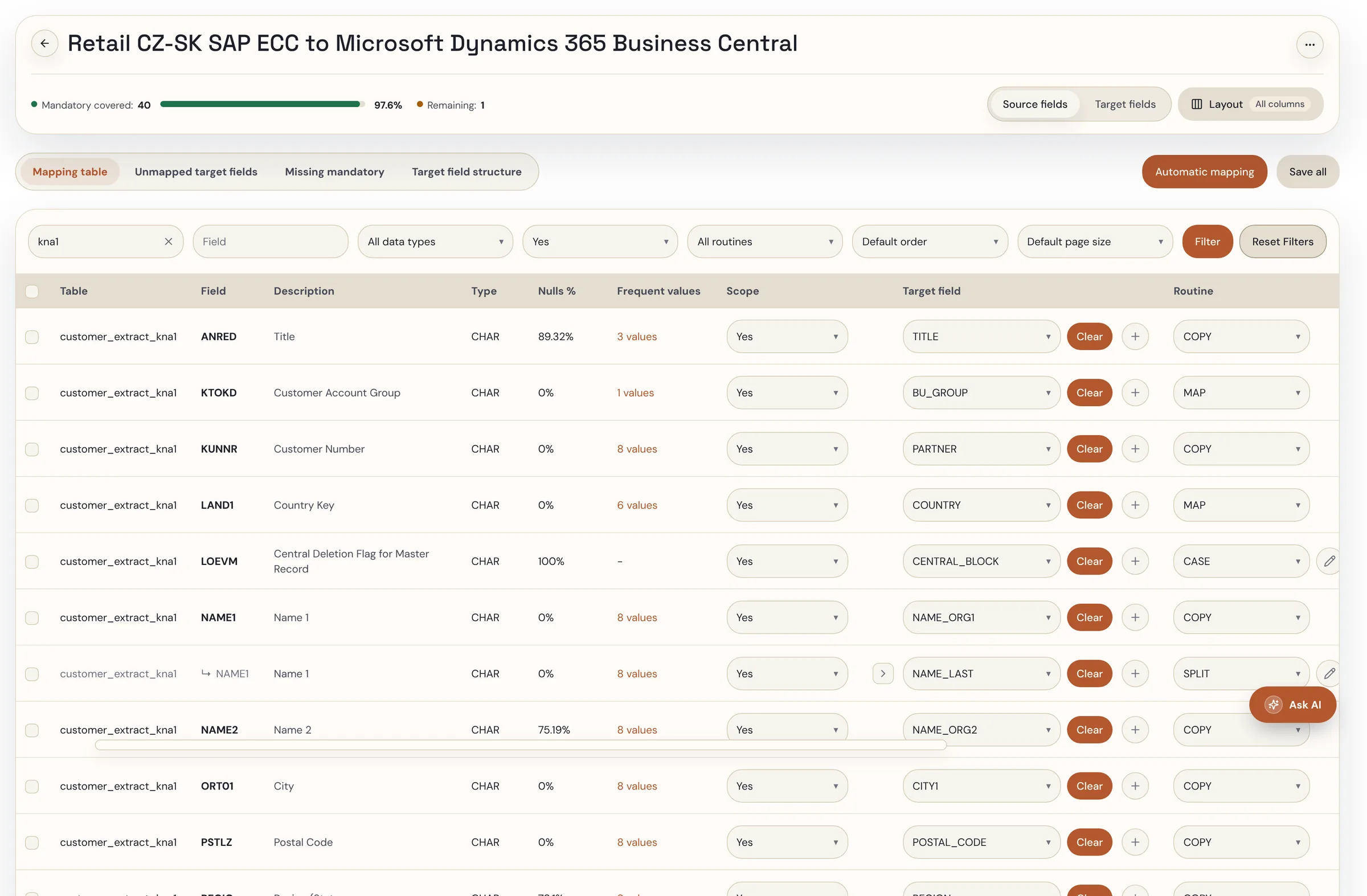
AI drafts F0101 → Business Partner. Your consultant approves every line.
vise FieldMap reads the JDE data dictionary and the S/4 target structure and proposes field pairs with transformation rules: Julian to ISO date, implied-decimal to typed amount, search type to BP role, category codes to classification. Each proposal carries a confidence score and a reason; the target-driven view shows every mandatory S/4 field as mapped, defaulted, manual-load or unresolved.
Mapping table — rule, confidence and approval per line (demo data) - Step 6 · Value Map
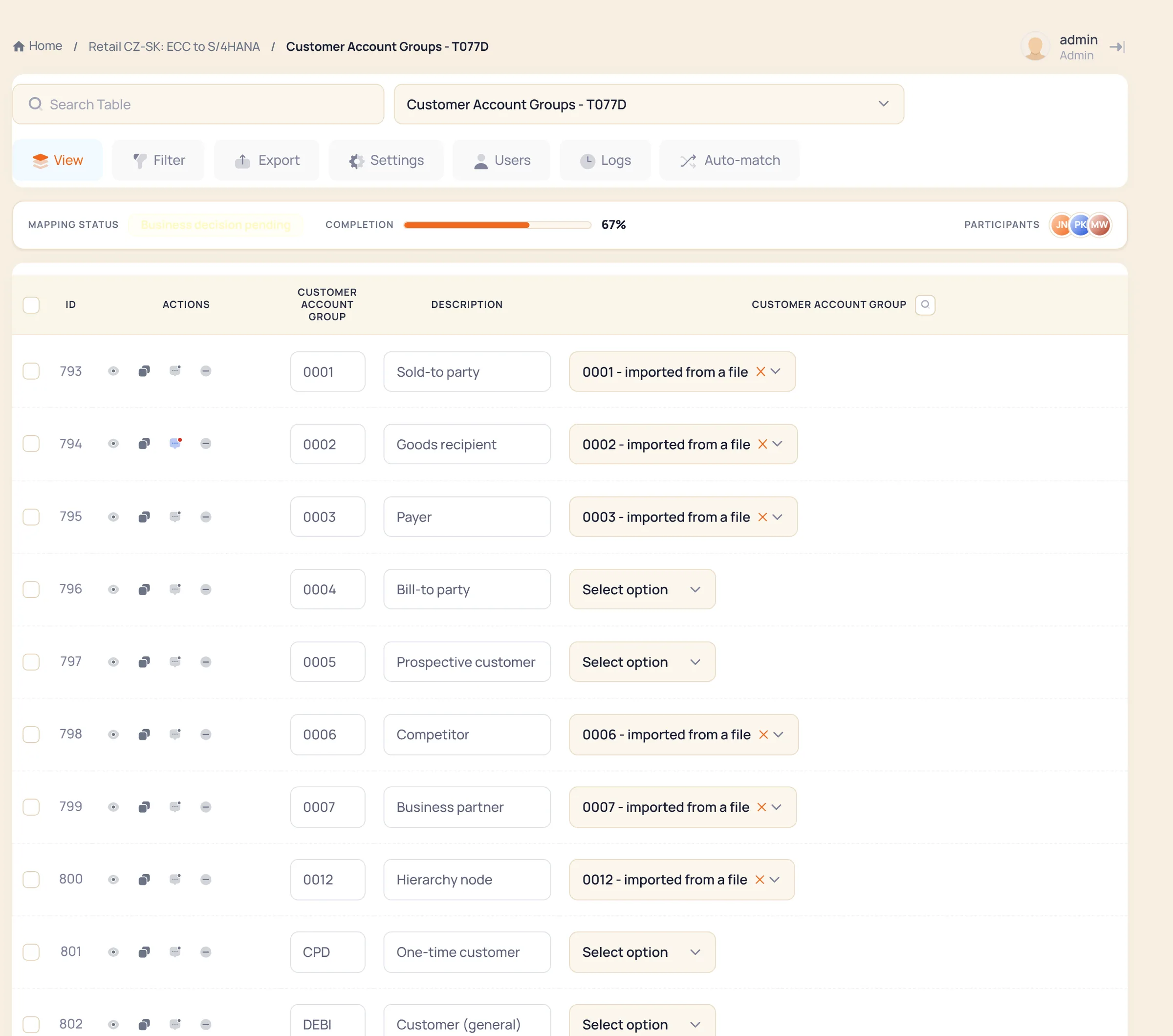
UDC tables become S/4 value lists — once, by the people who own them.
Payment terms, country codes, units of measure, item types, category codes, business unit types: every UDC list is loaded into vise LoV-MAP and mapped to the S/4 value list by the business owner, approved once and reused for every company in the wave. Dictionaries feed validation, so an unmapped UDC value is caught before the load.
Value mapping in vise LoV-MAP (demo data) - Step 7 · Load simulation
Dry-run through the real S/4 interfaces.
Business Partner through the BP APIs and CVI, materials through the standard BAPIs, finance through IDoc or OData — the same path the real load takes. Errors come back per record with the S/4 message; they go to the correction queue; the simulation is repeated until clean. vise DMW can also hand the mapped data to SAP Migration Cockpit or BODS if that is your load tool.
Screens for this step come from the migration demo. Ask for a walkthrough, or see it on your own object in the 30-day PoC. - Step 8 · Report
Reconciliation from JDE record to S/4 record.
What was extracted from which company, what was transformed by which rule, what was posted, what failed and why — per object, per company, per run. Plus the weekly summary the programme manager has been sending since step 1.
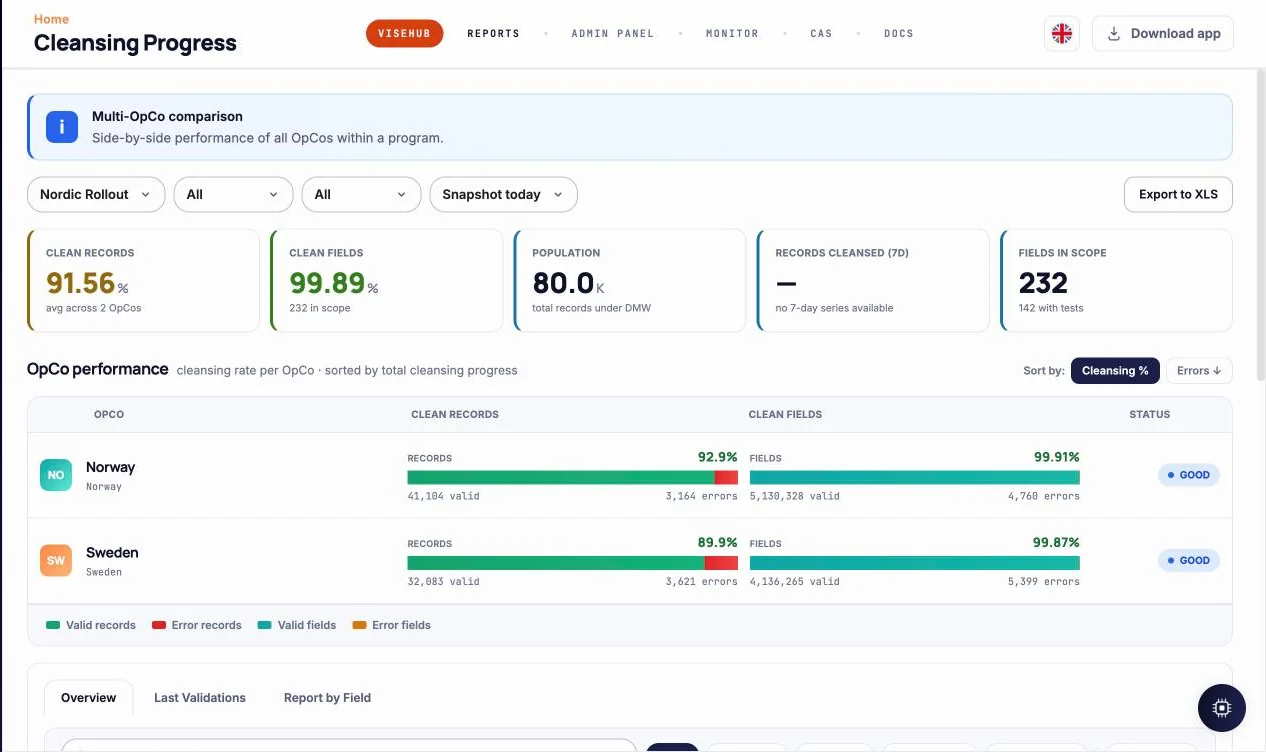
Cleansing progress per company
03 · 30-day proof of concept
What you have after 30 days.
- One JDE object — Address Book is the usual pick — extracted, profiled, validated, field-mapped and value-mapped to S/4HANA
- A load simulation against your S/4 system (or your load tool) with the error list and the fixes
- The decision record: which JDE structures map to which S/4 objects, with owner and date
- An effort estimate for the full wave, by object and company
In production
Rollout waves since 2017 Global brewing group vise DMW as the data readiness gate in front of every SAP rollout across the group’s operating companies, with sources ranging from legacy ERPs to spreadsheets — and vise Data Run for the everyday changes after go-live. Read more Non-SAP source, same method Karlsberg Customer and BOM data moved between SAP and Navision by one specialist instead of five; today the first production customer of vise FieldMap, mapping material data from Business Central to S/4HANA. Read more- 01EnterpriseOne or World?
- Both. The table layouts differ in detail but the structures — Address Book, Item Master and Branch, UDC tables, Business Unit.Object.Subsidiary accounts, Julian dates — are the same problem. Extraction is from the JDE database or from flat exports; we do not need an agent inside JDE.
- 02How do you get one Business Partner out of a customer and a supplier record?
- Address Book number is the natural key. DMW profiles F0101 against F0301 and F0401, proposes one BP per address number with customer and supplier roles, and flags the cases where the records disagree (different names, tax IDs, countries) for a decision. The rule is recorded, not applied silently.
- 03What about SAP Migration Cockpit?
- Use it if it fits. DMW adds change mode, load simulation, rule-based validation and a correction loop for business users — and can feed the Cockpit or BODS with the mapped, validated data instead of loading itself.
- 04Do you need our JDE consultants?
- For the decisions, yes: which companies, which category codes matter, how the chart of accounts is meant to split. For the mechanics, less so: the extraction, format conversions and mapping are the same work our specialists do on other legacy ERPs with vise DMW, and the JDE structures are documented. Your people approve and keep the decision record. The 30-day PoC on your Address Book is where we prove it on your data.
Start with the Address Book, in 30 days.
We extract F0101 and its customer and supplier masters from one company, validate it against S/4 rules, draft the Business Partner mapping and simulate the load — and you see what the full move will take.