vise FieldMap · Field Map step of vise DMW · also standalone
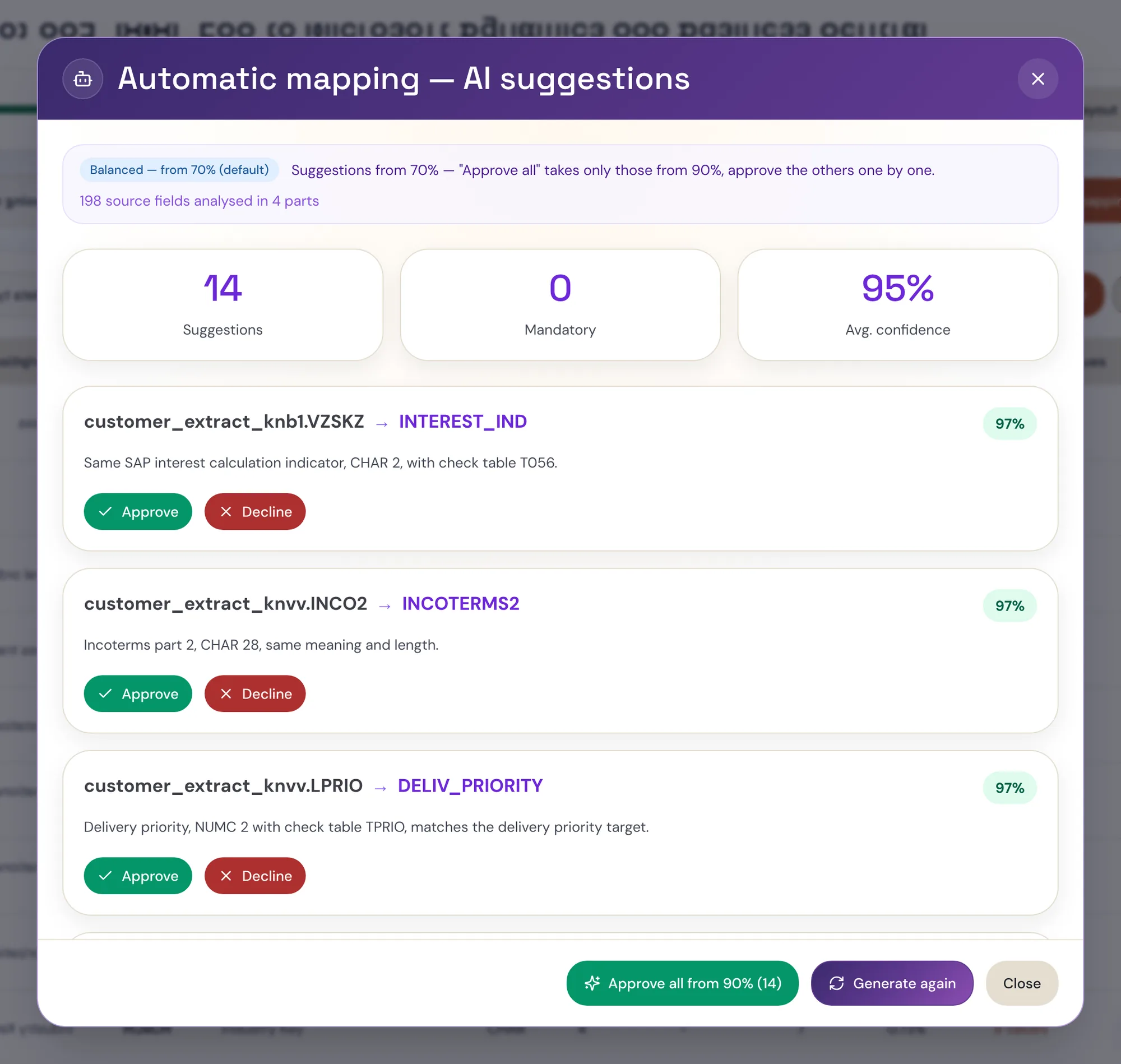
AI drafts the mapping. Your consultant approves every line.
Source-to-target field pairs and transformation rules, drafted from your metadata with a confidence score and the reason behind each proposal. Tested in a sandbox, approved by a named person, versioned — and only then loaded. The expert moves from typing rules to judging them.
- ≈30 → ≈12
- expert-days per object (illustrative)
- Metadata only
- leaves your environment by default
- 1st
- production customer: Karlsberg
01 · The control loop
Six steps between a sentence and a governed load.
- 0Plain-language specThe consultant describes the mapping need and the business meaning of the object.
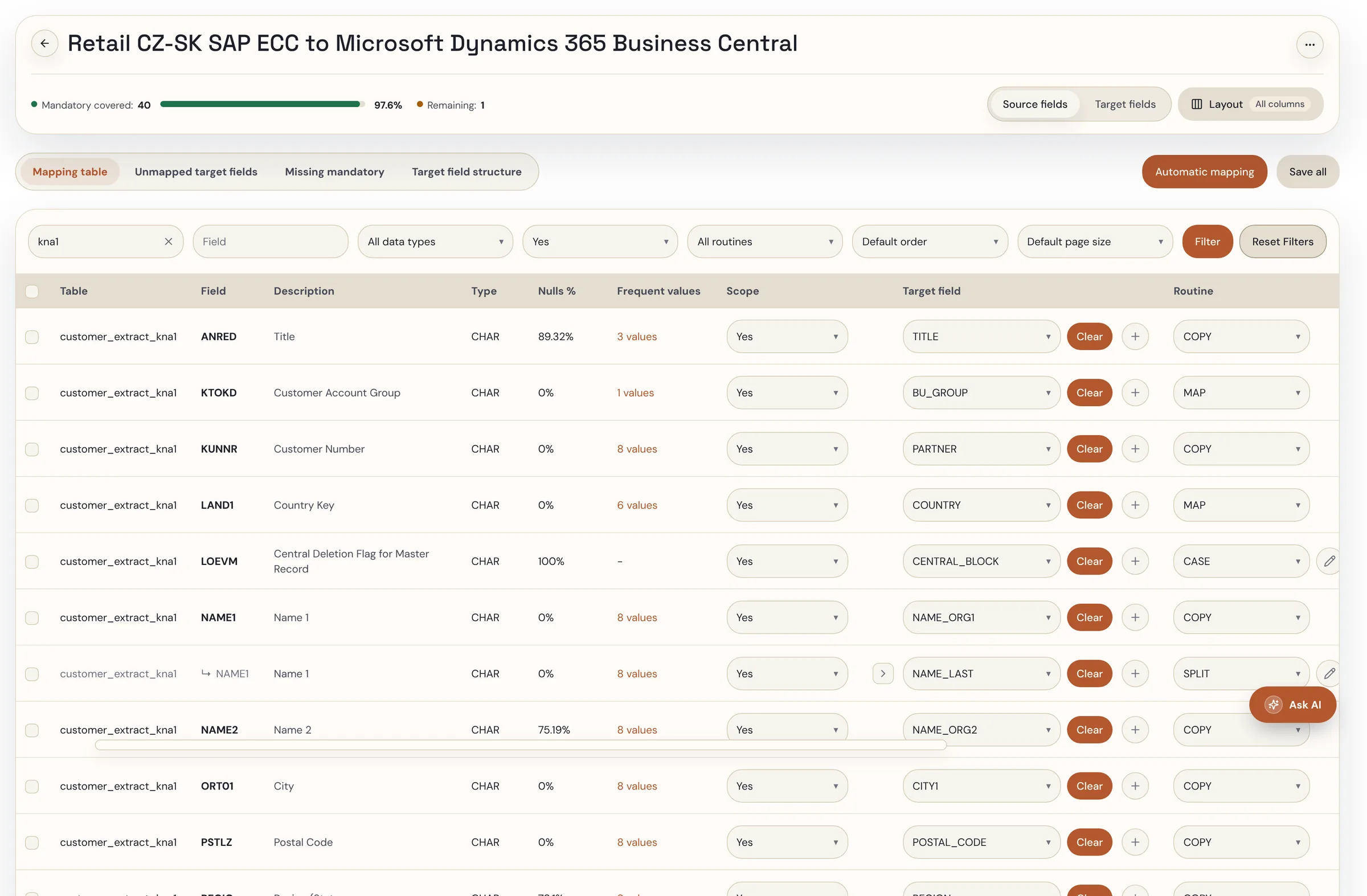
- 01AI draftFieldMap proposes field pairs and transformation rules from source and target metadata. The confidence score is the model’s assessment of semantic fit, type, length and value distribution — it orders the review, it is not a probability that the load will succeed.
- 02Sandbox testEvery rule runs in the rule tester on real records before it can be committed.
- 03Human approvalA named reviewer accepts, edits or rejects every line. Nothing reaches the target unapproved.
- 04Version and auditEach decision carries an owner and a date; the mapping is a versioned specification, not a spreadsheet.
- 05Governed loadThe approved mapping feeds vise DMW — or your load tool — for simulation and load.
02 · Your pipeline stays
Keep BODS or Migration Cockpit. Change how the mapping gets made.
FieldMap produces the approved mapping specification. Who executes it is your choice — and the hand-over is a file your team already knows how to read.
03 · Where it pays off
The hard part isn’t creating the mappings. It’s finding the mistakes too late.
Hundreds of field pairs built by hand in a spreadsheet, with no validation, no dependency checks and no visibility of what is hidden. Errors surface in the migration window, when each fix costs days. FieldMap finds them while they cost minutes — and explains why.
| Case | What was wrong | What FieldMap did |
|---|---|---|
| SAP ADRNR mapped to a document-number field | Labels and data looked plausible; the field is an internal address reference, not the business identifier the target expects. | Flagged as a semantic mismatch; the correct field suggested |
| City (35) → City (30) | A correct field pair, still risky: source length 35, target length 30. | Flagged for possible truncation of longer city names |
| Codes like 00123 | Stored in a numeric target field, leading zeros disappear and codes stop matching. | Identified as a risk before the load |
04 · Profile before you map
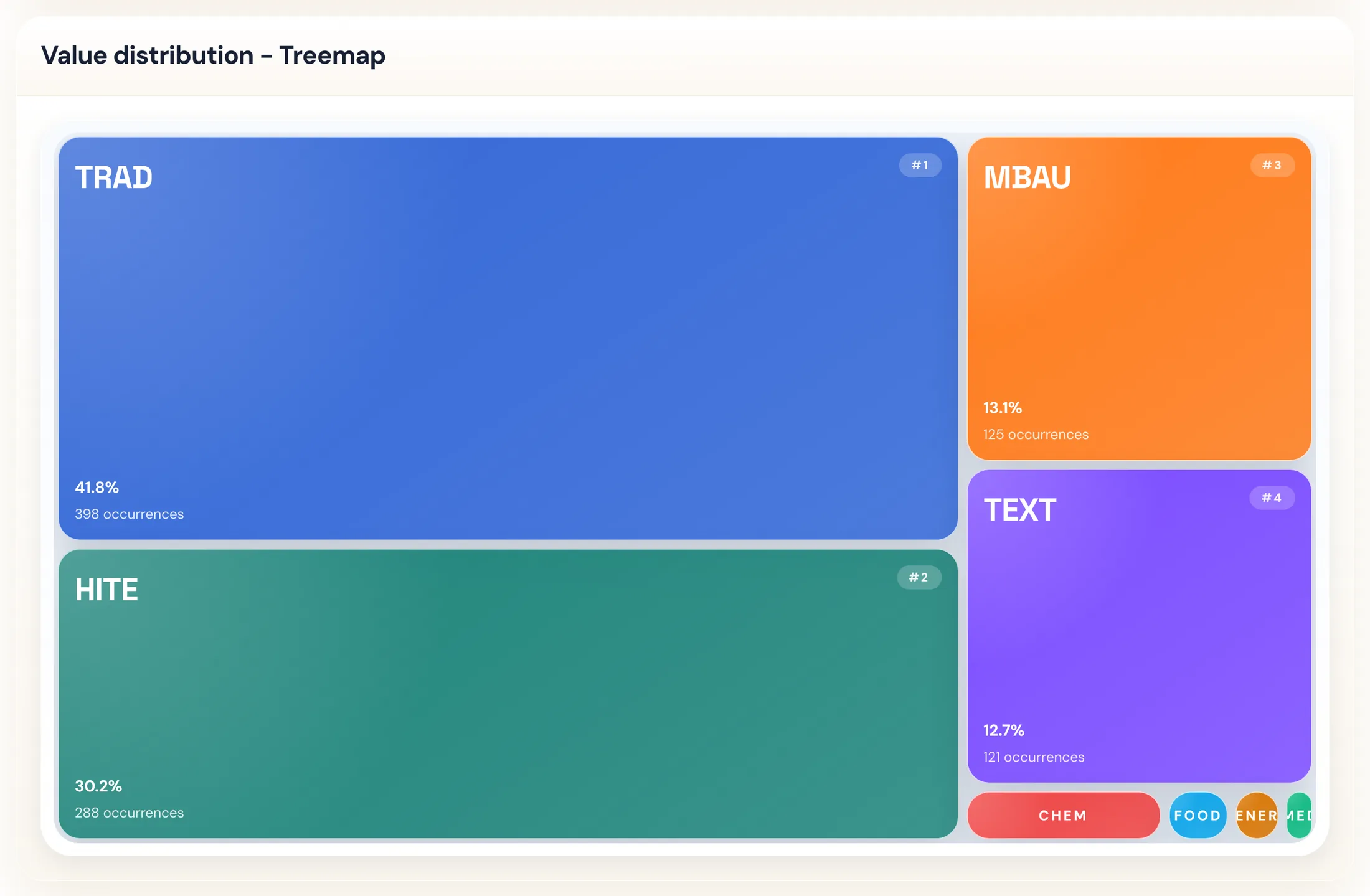
Every source field comes with its value distribution.
Nulls, distinct values, the top three and the long tail — per field, one click from the mapping row. A field that is 96% one value, a code list with eight members, a free-text column pretending to be a key: you see it before you decide where it goes, and the AI sees the same numbers when it proposes.
Seven views of the same profile: bar chart, Pareto, donut, treemap, heatmap, concentration (top-1, top-5, top-10 share) and the plain table — all exportable.
05 · Target-driven
Every mandatory target field has a status. None is forgotten.
Migration practice is target-driven: the question is not “where does this source field go” but “is every field the target needs resolved”. FieldMap shows the target structure with every field’s resolution, filters by status, and exports exactly what the filter shows. A source field can be reused for several targets without losing track of where it is used.
Dictionary fields — payment terms, account groups, countries, languages, reconciliation accounts — are marked as mappings and flow to vise LoV-MAP for value harmonisation.
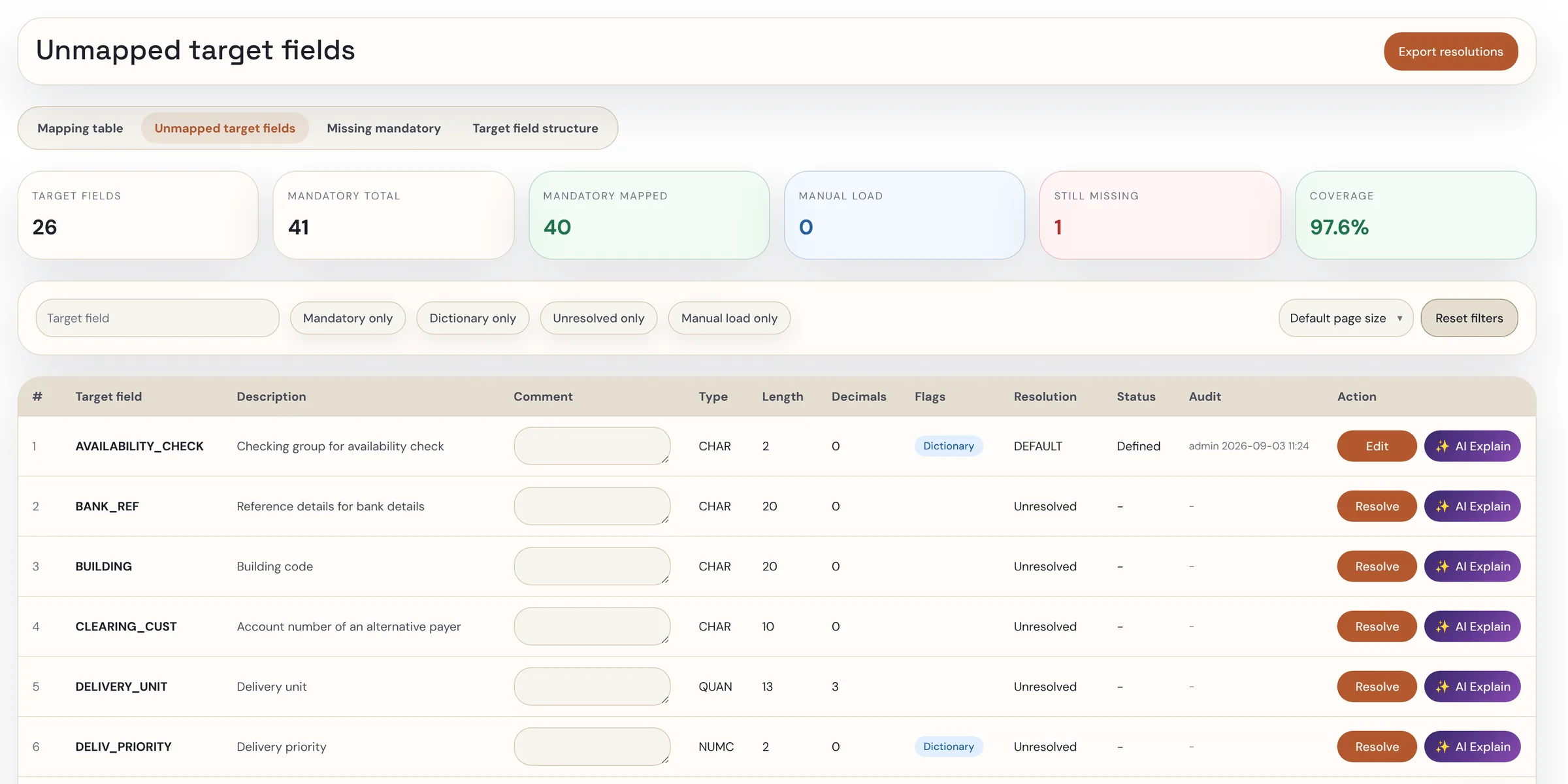
- Resolved
- Mapped from one or more source fields, with a transformation where needed
- Default value
- A constant or a derived value for fields absent in the source — including multi-value defaults that multiply records (e.g. one material → three language descriptions)
- Enrichment
- From a manual file, a lookup table or a derived rule
- Manual load
- Decided and documented: loaded by hand before go-live, with a reason and an owner
- Unresolved
- Still open — and visible, so nothing mandatory is forgotten
06 · Rules from a sentence
Transformation and validation rules, written in plain language, tested before they count.
Describe the rule — “BP grouping derives from the legacy vendor account group”, “a Norwegian VAT number is NO plus nine digits and MVA” — and FieldMap drafts it, runs it in the sandbox against real records and reports what passed. Rules are readable Python, not black boxes; business consultants can write and review them under the same governance as developers.
Karlsberg
Material master mapped from Microsoft Dynamics 365 Business Central to SAP S/4HANA with FieldMap; the consultant’s feedback from the first wave — target-driven view, reuse of source fields, multi-value defaults, manual-load resolution — went straight into the product.
The Karlsberg case →What AI sees. What your consultant controls.
- Stays in your DMW environment
- Your records and their values. The profiles, the rules, the sandbox runs, the versioned mapping and the audit trail. An isolated environment per customer.
- Sent to the AI provider by default
- Metadata only: field names, technical and business descriptions, types, lengths. Under a zero-data-retention agreement — prompts and outputs are not stored and never train models.
- Sent only if you switch it on
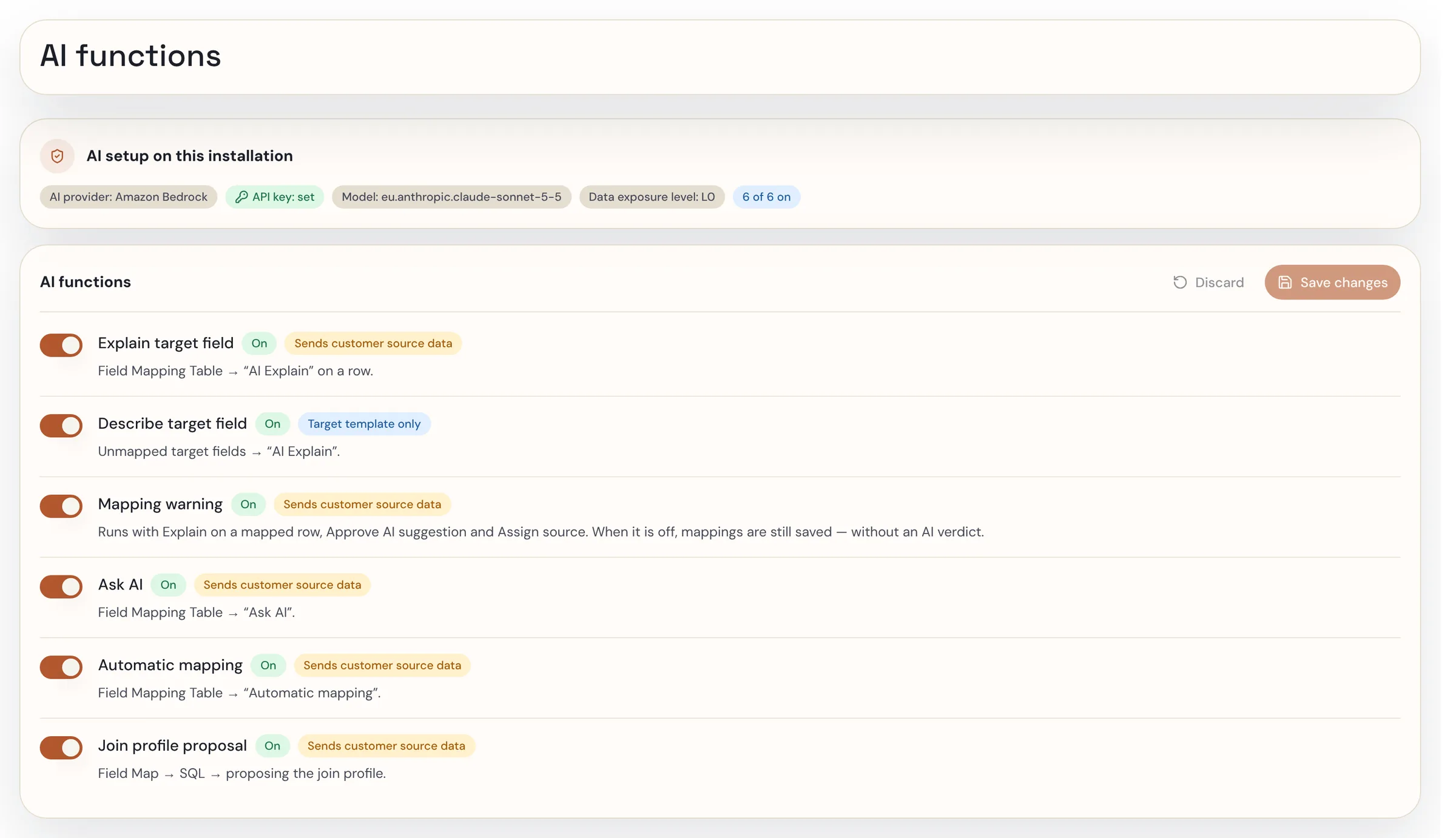
- Functions that use sample source values or value statistics to propose better rules. Each is a separate switch, labelled with what it sends, off by default — your data owner decides per function.
07 · FAQ
Questions we get.
- 01Where does our data go when the AI drafts a mapping?
- By default only metadata — field names, types, lengths, descriptions — leaves your environment; functions that would send sample source values are switched off and labelled, and you decide per function. Our agreements with the AI providers are zero data retention: prompts and outputs are not stored by the provider and are never used to train models. Provider and model are your choice.
- 02What does the AI actually produce?
- A draft: source-to-target field pairs, transformation rules and, from a sentence, validation rules — each with a confidence score and a plain-language rationale (semantic fit, type compatibility, length, value distribution). Proposals fall into three groups: approved cleanly, approved with problems to review, declined.
- 03Who decides?
- Your consultant or data owner, line by line, in a target-driven view that shows every mandatory target field as resolved, defaulted, manual-load or unresolved. Every decision has a name and a date.
- 04What does the confidence score mean?
- It is the model’s assessment of how well a proposed pair fits on four axes — semantic meaning, type compatibility, length, value distribution — with the reasoning shown next to it. It is not a calibrated probability that the record will load. Use it to order the review: high-confidence lines are checked quickly, low-confidence and semantically suspect lines get the time.
- 05Can we use it without vise DMW?
- Yes. FieldMap is the Field Map step of vise DMW and also runs standalone; the approved mapping exports to Migration Cockpit, BODS or your own loader as a versioned specification.
- 06What do we need to start?
- A metadata export of the source and the target object — field names, types, lengths, descriptions — and, for profiling, a sample extract of the source. One consultant or data owner who makes the decisions. The first object is typically mapped within the 30-day PoC.
See it on your own object.
Bring one conversion object. AI mapping and validation run inside full governance for 30 days, and you see what it does to the effort for that object. Your side: a metadata export of source and target, a sample extract, and one consultant to decide. Fixed-price consulting; no licence fee for the 30 days. What you measure: consultant hours on the object, the share of proposals accepted, edited and declined, mandatory-field coverage, and whether the export drops into your pipeline without rework.